Altered listing photos, labeled, with the originals one tap away
Since January 1, 2026, California asks agents to label digitally altered listing photos and to link to the unaltered originals. ListVivid helps you disclose altered photos on the listing website, the MLS tour, print and social.
California · AB 723
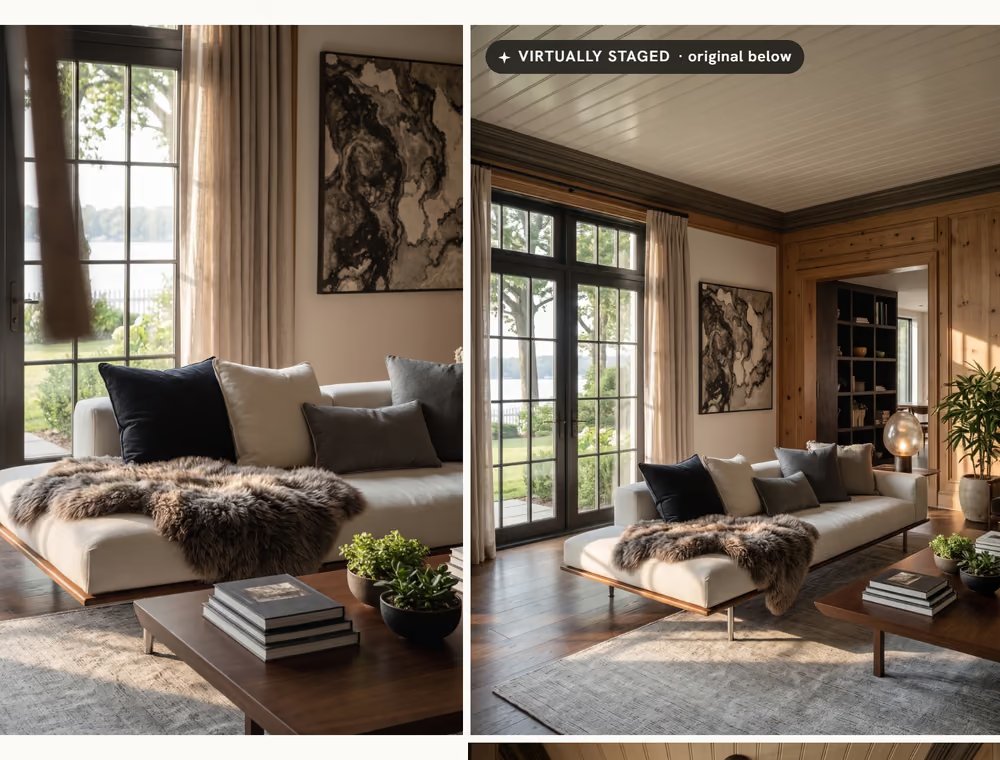
Illustration: AI-generated demo photos of the same rooms, furnished and empty. Not a real listing, and not staged by ListVivid.
What the rule asks for
California Business and Professions Code section 10140.8, in effect since January 1, 2026. In plain words:
Who
A real estate broker or salesperson, or someone acting for them, who advertises a property for sale.
A statement on or next to the photo
It says the image was altered, it is reasonably easy to see, and it says where the unaltered photos can be seen.
A link to the original
A link, web address or QR code to a public page that shows the original, unaltered photo and makes clear which one it is.
Your own website
Where you control the site, the originals go in the same posting, or the posting links to a public page that has them.
Source: California Legislative Information, Business and Professions Code section 10140.8.
What counts as altered
The test is whether an element of the property was added, removed or changed with photo editing software or AI.
Counts
- Furniture or decor added (virtual staging)
- Objects removed: wires, poles, cars, clutter
- Walls, paint, floors, fixtures or appliances changed
- Sky, lawn, landscape or facade replaced
- Views through windows, streetlights or neighboring houses changed
- Floor plans changed
Does not count
- Lighting and exposure
- White balance and color correction
- Sharpening
- Straightening and angle
- Cropping
- Other common edits that do not change how the property looks
How ListVivid helps you disclose altered photos
Mark a photo once. The label and the way to its original follow it everywhere the listing goes.
- 1
Mark the photo
In the editor, switch on “Digitally altered”, say what changed (virtual staging, objects removed, sky or landscape, finishes, other) and pick its original from the listing's photos.

- 2
A label on the photo
“Virtually Staged” or “Digitally Altered” sits on the photo wherever it appears: the website, the unbranded MLS tour, the seller preview and the full-screen viewer, with “original below” when the original is on the page.
- 3
The originals on the same page
Each original appears under “Original photos”, named after the photo it belongs to, and the footer links to it. The MLS tour shows them too, still without your name.

- 4
A check before you publish
When the property is in California or an agent on it is licensed there, publishing waits until every altered photo has its original.

- 5
Print, social and shared links
The listing sheet, flyer, brochures, postcard and social banners print the label on the photo and the address of the originals under the QR code. A shared link's preview carries the label too.
Print and social come with every paid listing and plan.

Steps 2, 3 and 5: Demo listing, fictional · AI-generated photos. Illustration: AI-generated demo photos of the same rooms, furnished and empty. Not a real listing, and not staged by ListVivid. Steps 1 and 4: the app's sample listing in the editor, also fictional.
California, and every other state
California
Publishing asks for the originals when the property is in California or an agent on it is licensed there.
Every state
Altered photos carry their label in every state. Check your own state's and MLS's rules.
What stays with you
ListVivid is not a law firm, and this page is not legal advice. You and your broker stay responsible for your advertising. Your MLS may ask for more, such as its own photo remarks or rules on staged photos. Photos you post elsewhere, in the MLS photo field, on portals or on your own social accounts, need their own label and link.

Does ListVivid handle AB 723 for me?
It helps you disclose altered photos: the label, the originals on the listing page and a check before you publish. You and your broker stay responsible, and photos you post outside ListVivid need their own label and link.
I only brightened the photo. Do I need to label it?
Not under the text of the law. Lighting, exposure, white balance, color correction, sharpening, straightening, angle and cropping are not alterations. Adding furniture or removing a power line is.
Where do the originals live?
On the listing's own page, under “Original photos”. Print and banners point there with the web address and the QR code.
Does the MLS tour show the originals?
Yes. The unbranded tour carries the same labels and the “Original photos” section, still without your name, team or brokerage.
My listing is not in California. What changes?
Altered photos carry their label in every state. Publishing asks for the originals when the property is in California or an agent on it is licensed there. Check your own state's and MLS's rules.
Does ListVivid stage photos?
No. Bring photos staged or edited elsewhere. ListVivid labels them and shows their originals.
Not a ListVivid customer?
A free disclosure page for any listing is coming: upload the altered photo and its original, get a link and a QR code.